

Amazon MWS: The Smart Way to Manage Your Online Business
WB
WebBee Team
eCommerce Specialists
Are you currently selling on Amazon and looking to simplify your business workflows & gain a competitive edge? Then Amazon MWS might be what you require. If you need to handle your orders, inventory, or get product listings & pricing data, Marketplace Web Service makes it simple to automate your selling procedure & exchange data safely and accurately with Amazon.
In this blog, we will discuss Amazon MWS & how you can utilize it in a simple way.
It is a fully functional web API that assists Amazon sellers in automatically exchanging data on orders, listings, reports, payments, & more. To know MWS, you should know what an API is. An API is a set of protocols & rules enabling multiple software apps to connect & communicate. Overall, Amazon MWS is an API especially crafted for Amazon sellers. You should utilize it to connect with Amazon’s systems systematically & automate different tasks.
Similarly, the cart API provides the ability for a seller to add, replace and remove products from customer’s cart; these are the all different function of API automated by Amazon MWS API.
With Amazon MWS and API, eCommerce businesses are bound to take a leap and there isn’t going to be any looking back here after. It’s just nothing less than the magic wand your business management ever needed. Also, we provide Shopify Amazon Integration services with customize ERP software.
Cart information API
With the Cart information API section of Amazon Marketplace Internet Service, you’ll be able to retrieve carts that your Amazon Webstore customers have created and abandoned. The Cart information API section allows you to programmatically integrate Amazon Webstore cart info along with your CRM systems, promoting applications, and different systems that need cart data.
Client info API
With the client info API section of Amazon Marketplace web service, you’ll also be able to retrieve info from your customer’s accounts. This client data includes client name, contact details, client account type and related Amazon Webstore. The client information API section allows you to integrate Amazon Webstore client account info along with your CRM systems, promoting applications, and different systems that need client data.
Webstore API
With the section of Webstore API, one can plan and fix their Amazon Inventory cycle of replacement and refill, by tracking the products subscribed by the customers. ‘Notify me when available’ tab is an important feature that informs the buyer about availability if subscribed. The API Section of Webstore can also furnish information and data about the various notifications sent to customers when the products are back in stock.
Developers Customization API
Developers will use the web site Customization API set to make distinctive shopping for experiences and integrate your Amazon Webstore with different applications and systems. You can use the Search Product API to retrieve one product or a group of merchandise. You’ll be able to retrieve merchandise by a question expression, like a group of keywords through the API.
Search Product API
The Search Product API returns everything you wish to drive a product search result application. The Browse categories API supports the hierarchy retrieval of class pages. A category page is employed to categorize or assign merchandise so as to show them on totally different pages of an Amazon Webstore.
Adding to the existing Webstore search and APIs for products, one can use the batch of an API to find data for multiple products; this is done using a service call. The server responds to API calls for each and every call it receives, that includes the ones added in the batch request. After the call is responded, you can then parse the calls and relate the obtained results with original API.
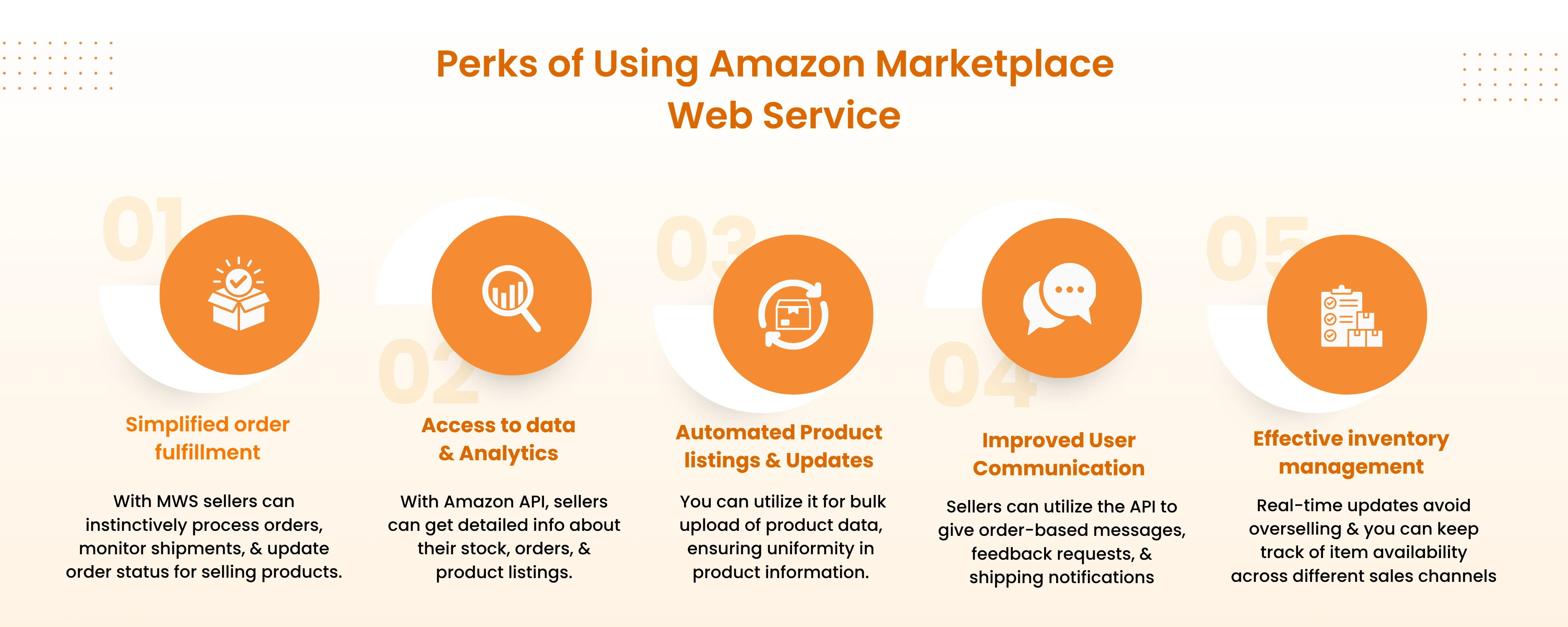
With the MWS API, sellers can instinctively process orders, monitor shipments, & update order status for selling products. This kind of automation saves effort & time while reducing the risk of mistakes in fulfillment methods.
Sellers who are selling on Amazon, the foremost benefit that it brings is certainly real-time gain from a high volume of data & analytics. With Amazon API, sellers can get detailed info about their stock, orders, & product listings.
Despite just manually making or changing listings individually, you can utilize it for bulk upload of product data, ensuring uniformity in product information.
It promotes better connections between sellers & their users. Sellers can utilize the API to give order-based messages, feedback requests, & shipping notifications.
It also assists sellers in handling their stock more effectively. Real-time updates avoid overselling & you can keep track of item availability across different sales channels.
Let’s explore the steps of how to use Amazon MWS.
It is not the only method to allow developers to smoothly incorporate their apps or systems with Amazon’s service & platform. There are various 3rd-party tools that can perform the same or interact with MWS to make this process better.
Specifically, WebBee showcases the simplest way to involve in multi-channel sales, enabling you to smoothly list items, sync inventory, & efficiently manage orders over primary online marketplaces, including Amazon.
The strength of Amazon MWS is actually groundbreaking when it comes to increasing your selling performance on Amazon. If you're an experienced seller or just beginning, MWS is the ultimate API combination that will change the way you do business on Amazon. By utilizing MWS, you can lessen costs & enhance your sales effortlessly.
1. Is Amazon MWS exchanged by the Selling Partner API?
Yes, MWS can be fully replaced by the Selling Partner API.
2. What are the benefits of using MWS?
3. What is MWS on Amazon?
It is a set of API that enables Amazon merchants to automate business processes, like order fulfillment, inventory management, & pricing.

.svg)