

Enable Shopify POS System with Robust NetSuite Integrator
WB
WebBee Team
eCommerce Specialists
Are you an online seller who has a physical store too, and you find it difficult to manage the store transactions? Streamlining finances across various channels, both online and offline, is quite important for any business. It helps in revenue and finance analysis and managing taxes globally. This can get a bit complicated for Shopify retailers who utilize a Point of Sale along with an online store. Does this mean there is no alternative? Absolutely not! WebBee has dynamic integration software that helps you manage POS settings with ease. Want to know how? Stay tuned for learning everything about Shopify POS system.
It is a combination of hardware and software that sellers install in their retail store or any other physical outlet. It is primarily used to accept payments and issue receipts for the customer's purchase. With added functionalities, they can also be used to track sales in real-time. The hardware includes the cash registers, barcode scanners, card readers, receipt printers, and other devices. The software is basically a program that supports all the actions, such as transactions, inventory updates, reporting, and many others.
A retail POS can be integrated with a customer relationship management (CRM) tool to analyze customer data for enhancing their experience. They can customize this tool according to their requirements and gain appropriate data about the customers. This way, they can analyze customer behaviour and deliver better services.
POS system automatically updates the inventory level of the item whenever a customer purchases it and completes the payment. This is useful to maintain the stock levels and offer enhanced customer service.
POS is not limited to payments, but it provides an in-depth analysis of all the sales transactions. With the data collected by POS, sellers can understand the individual customer needs and shopping behavior. They can also analyze which product is making more sales at which store, which is important to make relevant strategies for enhancing sales.
POS helps integrate sales across multiple channels such as retail stores, online stores, websites, or other channels. So, sellers who want to grow on multiple channels, POS can be very helpful in managing the finances, which is a major operational issue.
If a Shopify seller wants to create an order for an item purchased through POS in NetSuite, it has to enter all details of the customer. These include its name, address, contact number, email ID, and many others. If these details are not available, NetSuite does not let the seller create an order. This means that it will not be recorded in NetSuite ERP, hence, it will not be considered for further processes such as financial data analysis. This may make POS transaction management more complex.
To avoid these complications, Robust NetSuite Integrator by WebBee is a great option as it helps utilize the Shopify POS Integration with ease. POS order creation has several use cases, and in each of them, you can utilize this integrator for effective transactional management.
If the customer at the POS does not provide their address or other details, they can create the POS order without the customer's address and other details. Robust NetSuite Integrator creates a separate customer account by the name of a particular POS store associated with the Shopify account. All such orders without customer details are transferred to this account, which has all the details required to create an order in NetSuite.
This use case is also similar to the one discussed above. In case the customer details are incorrect in an order, and they do not wish to create a separate account for such customers, they can leverage the Robust NetSuite Integrator. It helps them manage such orders in a separate account, as mentioned in the above use case.
NetSuite Integrator syncs all the POS transactions in a single NetSuite customer account. They can sync all the transactional information through an automated process to that account, which simplifies the financial management.
POS setting offers various functionalities to support multiple conditions for orders made in a physical store or any channel utilizing POS transactions. To access them, they just need to log in to the Shopify app store and select Robust NetSuite Integrator. Now, click on the Configuration tab and select Point of Sale Settings. Let us see how Robust NetSuite Integrator helps Shopify sellers execute these features and how they are useful.
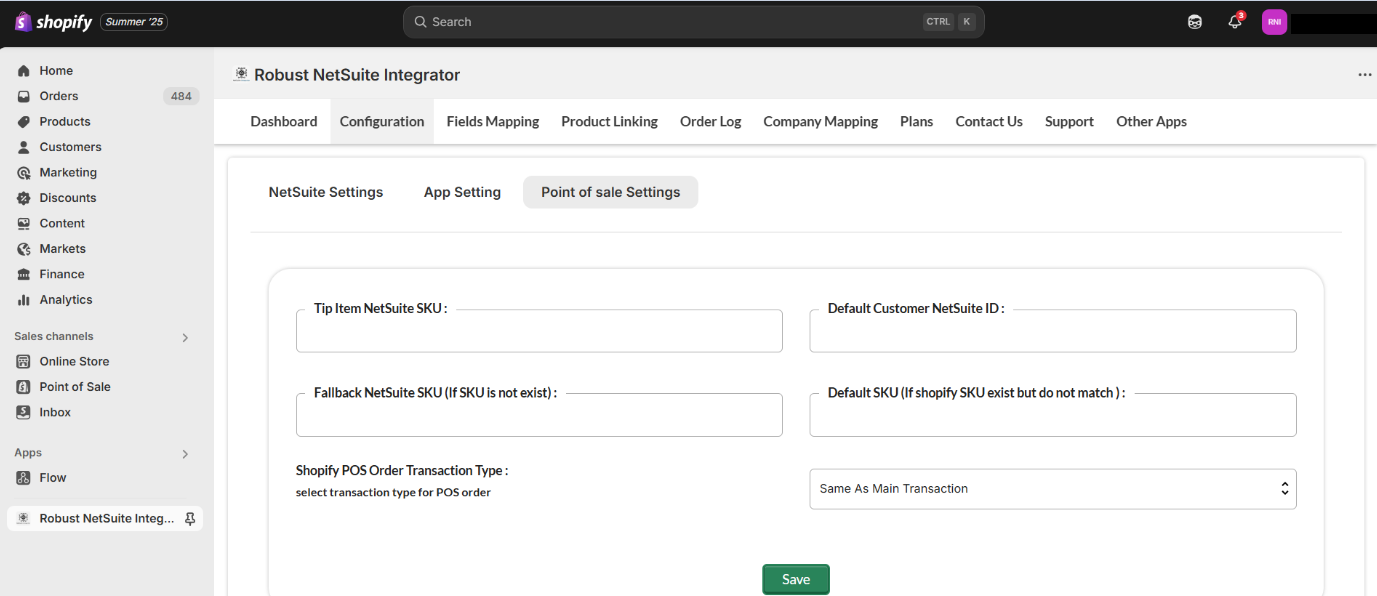
Suppose a customer leaves a tip while paying for the product through a POS at the physical store. In this case, sellers can create a custom item in an order with the name as Tip. They can add the tip amount to this item. This helps the seller in differentiating the amount received for the order and the tip separately. Robust NetSuite Integrator helps the sellers sync this tip amount with the sales order created at the POS.
Suppose an order is created in Shopify with multiple items without an SKU. Sellers have to link all these items to a common item available in NetSuite. How can they do this? They need to copy the Item Name/Number of that common item and paste it in the required field in Shopify. This helps in syncing orders even without an SKU, which enhances the financial management.
This feature is used when a Shopify SKU is available for an order, and any of the following conditions:
In both these cases, a default SKU is used to sync the Shopify orders. Just fill this SKU in the appropriate box, click on Save, and resubmit the order.
Managing finances effectively helps sellers grow seamlessly, and hence, POS transactions become quite important. At the same time, growth opportunities lie in eCommerce if the business scales both online and offline. Therefore, switch to solutions that help expand at both places and manage Shopify POS transactions efficiently. Robust NetSuite Integrator by WebBee helps utilize the powerful automation and dynamic features that simplify business today, so you can grow tomorrow and in the future.
Leverage Shopify POS Integration and many other functionalities today. Contact Us now and learn more about integration solutions and scale your business effectively.
.svg)