

ShipBob + Amazon MCF + Shopify: Multi-3PL Integration Guide
WB
WebBee Team
eCommerce Specialists
Do you want to utilize ShipBob for fulfilling Shopify orders, but figuring out where to start? Congratulations! Your quest ends here! This blog will tell you the methods of Shopify integration with ShipBob and other 3PL(third-party logistics) platforms simultaneously. You can also understand how it can benefit online sellers by boosting sales and improving operational efficiency. Ready? Let’s begin with the basics!
Many US sellers might have heard this name before, but for those who are not aware, ShipBob is a well-known third-party logistics provider and the most popular global order fulfillment solution in the US. It was founded in 2014 and currently has warehouses in the following countries:
1. US
2. Canada
3. Australia
4. Europe
Eventually, partnered with various DTC and B2B brands to pick, pack, and ship orders across 60+ global locations.
When the Shopify store is connected with ShipBob 3PL for automating order fulfillment using a connector extension, it is called ShipBob Shopify Integration. It helps Shopify sellers automate various e-commerce operations, such as:
1. Inventory Management
2. Order Fulfillment
3. Shipping & Delivery
4. Order Tracking, and many others
Here are a few important reasons why 3PLs are important for Shopify Sellers:
1. Efficient Order Fulfillment: Merchants connect 3PL with their Shopify Store so they can fulfill orders efficiently across multiple locations.
2. Swift Shipping: The major factor responsible for enhancing customer satisfaction is delivering orders on time. Hence, 3PLs are necessary to make faster shipping so orders can reach customers faster.
3. Distributed Warehousing: Many 3PLs offer warehouse services close to customer locations. It helps reduce shipping time and costs, which increases revenue and enhances customer experience.
4. Accurate Order Fulfillment: Advanced technologies of 3PLs make the operations error-free. This helps increase the accuracy of order information and minimize wrong order shipments.
5. Reduced Operational Cost: 3PLs are a cheaper method of e-commerce order management and fulfillment. Shopify online merchants can save a significant amount if they integrate ShipBob with Shopify.
Now that you have understood the importance of ShipBob integration, let us see how Shopify merchants can create an account. First of all, it is not a simple sign-up procedure; their representatives are responsible for creating the account. Let us see how it is done!
1. Go to the official website of ShipBob.
2. Find the "Pricing" or "Request a Quote" section on the page.
3. You have to fill out a form with your business information, such as:
a. Your company name
b. Contact information, and
c. Estimated monthly order volume
4. A ShipBob sales representative will review the information and schedule a consultation with the seller.
5. If the business meets the criteria, the representative will set up a new account.
6. They will send a confirmation email, which sellers have to accept, and the dashboard will be set up.
There are basically two methods of connecting ShipBob with Shopify. The first method involves integrating it using the dedicated dashboard, and the other one involves using a Shopify connector. Let us understand both the methods, and later we will figure out which one is better.
Once the seller has created an account, they have to follow these steps:
1. Log in to the ShipBob account and access the dashboard.
2. On the left-hand navigation bar, click on the Quick Action.
3. A pop-up window will appear, and click on the Store integration and further select Shopify.
4. Now start the installation process by clicking on the Install button.
5. Once the installation is completed, it will redirect you to the Shopify app store. It has to be authorized by logging in to the account.
6. Now connect the Shopify store with ShipBob according to the requirements.
This way, sellers can connect their store parallelly. There is one more way to perform this integration, which is through a third-party integrator application. But how is it different, and do sellers even need it?
Let's try to understand this through this use case!
Suppose Shopify sellers connect with ShipBob using the above method. However, any seller who is already using Amazon MCF would have to manage both integrations in different platforms. They would also have to decide the shipping method they want for their orders manually! Seems hassled? Well, it is! So what is the solution?
It’s simple! - Utilize an efficient integrator that connects multiple 3PLs.
Well, they can get more choices for fulfilling their orders and can automate their e-commerce operations. This combination of freedom of choice + automation would help sellers grow faster. So, let us see how we can connect Shopify ShipBob and other 3PLs simultaneously on a single dashboard using the global fulfillment connector plugin - Amazon MCF by WebBee application.
1. Install the Amazon MCF by WebBee application from Shopify app store.
2. Select the Configuration tab from the main dashboard.
3. Now scroll down to the App Settings. Put the lambda URL given by the WebBee and write the username and password.

4. Further scroll down to the Non-Amazon 3PL Settings and select the Enabled option from the Enable Non-Amazon 3PL checklist.
5. You can further make other settings, such as fulfillment priority.
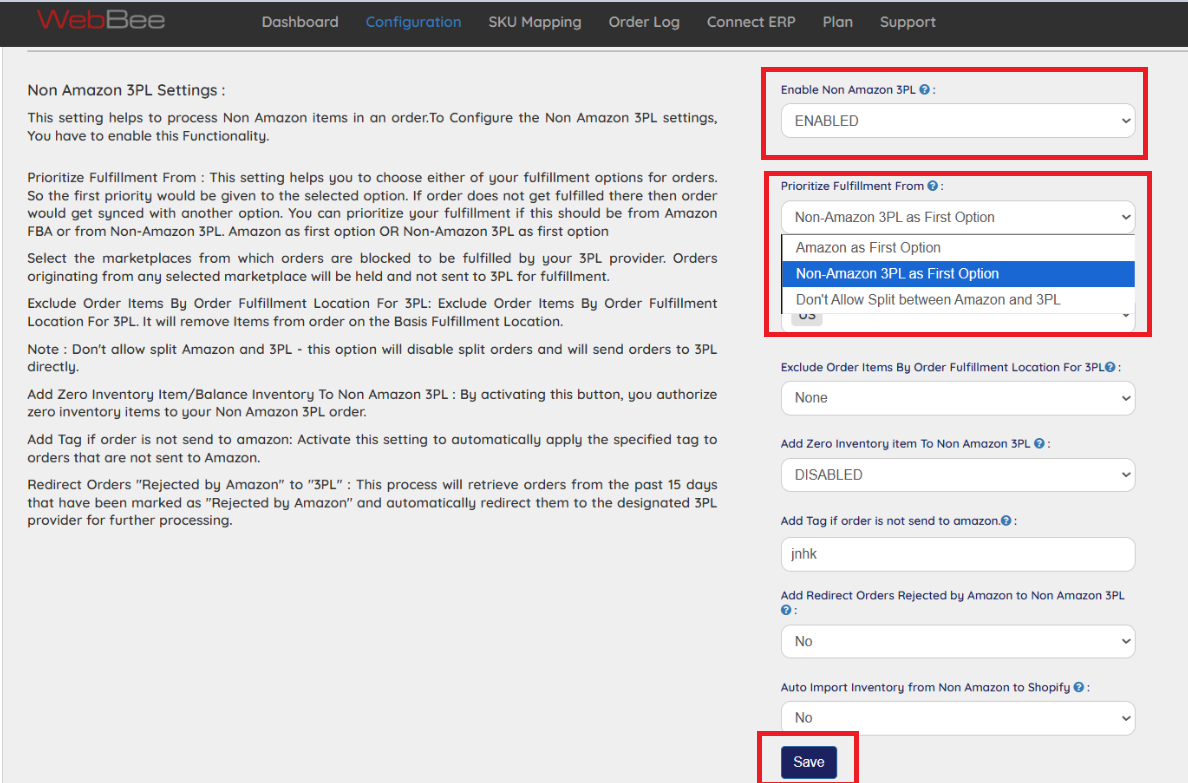
6. Click on the Save button.
If sellers connect their Shopify store to ShipBob with Amazon MCF by WebBee, it automates the e-commerce operations, which helps sellers save time and resources. But the advantages are not limited to automation! It offers various other functionalities that benefit sellers in multiple ways:
Shopify merchants can connect with Amazon MCF and ShipBob simultaneously using this integrator. This means that they have more control over their fulfillment method, and they can strategize it better. They can efficiently manage shipping that would save costs and serve customers better.
If a seller has more than one Shopify store, they do not need multiple integrators to connect them with 3PLs. Our application supports multiple Shopify store integrations, which help manage them easily.
Do you sell globally in multiple Shopify marketplaces? Easily add various locations with a few clicks and start selling seamlessly.
Afraid of multiple integrations for 3PL and Shopify Stores?
Our single dashboard can help you easily manage all integrations without any hassle.
Adding a 3PL integrator might seem a bit costly to the sellers in the first place. However, when it comes to reaping its benefits, the ROI is pretty much higher. Using its automation, sellers can reduce time and make processes faster. Also, they can reduce the resources required. Hence, it minimizes the operational cost while improving operational efficiency.
Automated 3PL integration help sellers sync orders in real-time, which improves the speed of order fulfillment. If any seller faces issues in syncing orders, just go to the main dashboard and activate order sync by clicking on the toggle button on the left-hand side of the dashboard.
It is a major challenge for sellers to know about failed orders. With Amazon MCF by WebBee, this issue can be easily resolved. Sellers even get a notification about the orders rejected so they can know the reason behind order failure. It helps them understand why the order failed to fulfillment, hence, they can take necessary action.
Sellers have to simply click on the shipping sync button on the main dashboard and reset a few settings linked to shipping.
Shopify merchants, who sell in various countries, do business in multiple currencies. It can be tricky to manage the fluctuations and calculate effective prices due to changes in market exchange rates. With an efficient 3PL integration, such as Amazon MCF by WebBee, it is just a single click away.
If the tax calculations are incorrect, it can impact the overall revenue. Because our 3PL integrator offers multiple currency support, the tax can also be calculated in various currencies. Simply select the marketplace, currency, and make necessary adjustments to the tax percentages. Sellers can automate tax calculations for every order through the 3PL integrator.
.png)
If Shopify sellers want to fulfill orders efficiently, ShipBob can help them achieve the same. The best part is that ShipBob fulfillment integration can be done through a 3PL connector, which automates the e-commerce operations. It also offers advanced functionalities for Shopify inventory management and other operations, such as:
1. order syncing
2. product listing
3. real-time tracking
ShipBob global fulfillment solutions help Shopify merchants sell limitlessly and fulfill orders across the world efficiently, and we are here to simplify it! Have questions? Contact Us to get the best e-commerce solutions for your business today!
.webp)
.svg)