

Shopify Market Mapping with NetSuite Subsidiary for Business
WB
WebBee Team
eCommerce Specialists
Want to scale globally with multiple Shopify markets, but inefficient business processes due to a lack of real-time visibility are keeping you behind? Here is a way to overcome this issue by mapping your Shopify markets with NetSuite subsidiaries. This may be a difficult task for many Shopify sellers, but we are here to help you out with an efficient NetSuite ERP connector. Stay reading to find out how you can deploy this powerful functionality.
It is a process in which a Shopify seller maps its various markets with NetSuite subsidiaries. This helps the sellers track business operations at each subsidiary, which boosts productivity and enhances efficiency through Shopify NetSuite integration. This mapping may be difficult for sellers to execute; hence, they can leverage the Robust NetSuite integrator by WebBee for this process, which helps them deploy mapping with various customized functionalities.
This mapping offers several benefits to Shopify online retailers. Let's have a quick glance at the advantages that it brings along with operational enhancements.
The first benefit is the huge cost savings associated with this mapping. Strategic order fulfillment leads to cost savings that indirectly increase revenue and, consequently, profit.
When Shopify merchants store their inventory at various locations, it becomes difficult to manage it. However, they can deploy real-time inventory tracking by mapping their Shopify markets with NetSuite subsidiaries. It helps keep the stock levels updated, which makes the order processing faster and improves customer experience.
Similar to inventory management, mapping Shopify markets with NetSuite ERP Subsidiaries helps track the orders in real-time. Through this feature, Shopify online merchants can identify where the issues lie, so they can tackle them immediately and improve the order processing for faster deliveries.
Sellers get the accurate financial reports for each subsidiary, which helps them understand its financial condition individually. This helps them make better decisions to overcome operational challenges and strategize for better financial performance.
Wondering how you can leverage all the above benefits? If you think the process will be time-consuming and complicated, it's a wrong assumption. You just need to follow these simple steps, and the Shopify market will be mapped with NetSuite subsidiary.
1. Log in to your Shopify app store and select Robust NetSuite Integrator.
2. Now go to the Configurations tab and scroll down for the Subsidiary settings.
3. Now, click on the Add More button.

4. You will get an interface like this, in which you have to fill in the Shopify Market and NetSuite Subsidiary.

5. Now, select the Shopify Market that you want to connect with a subsidiary.
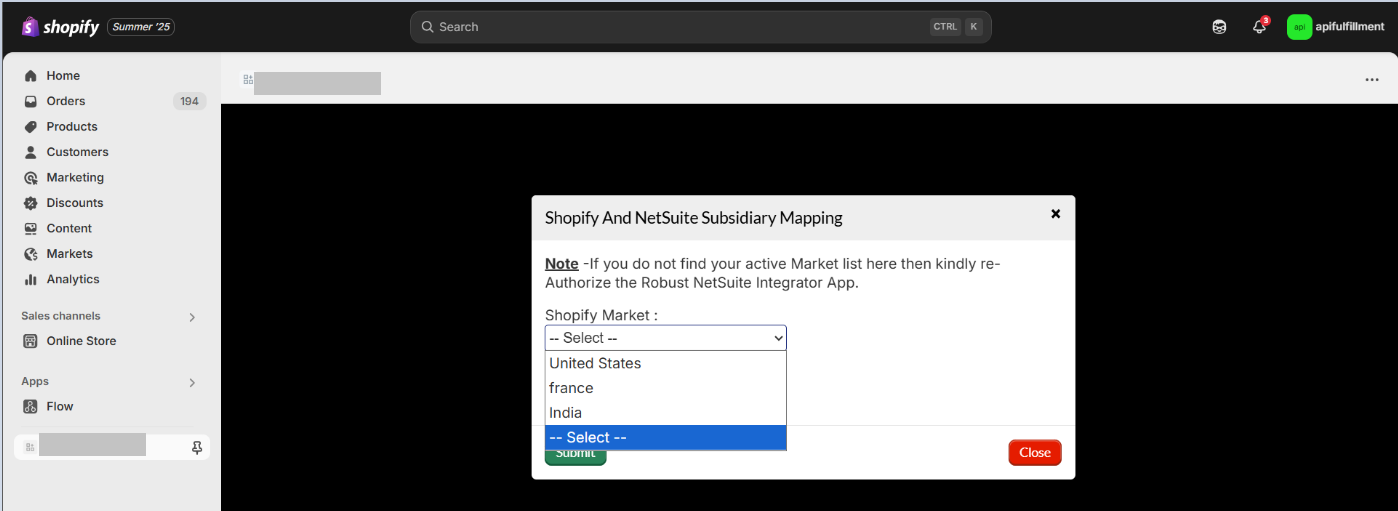
6. Now, select the NetSuite Subsidiary that you want to connect to the Shopify Market and then click on the Submit button.

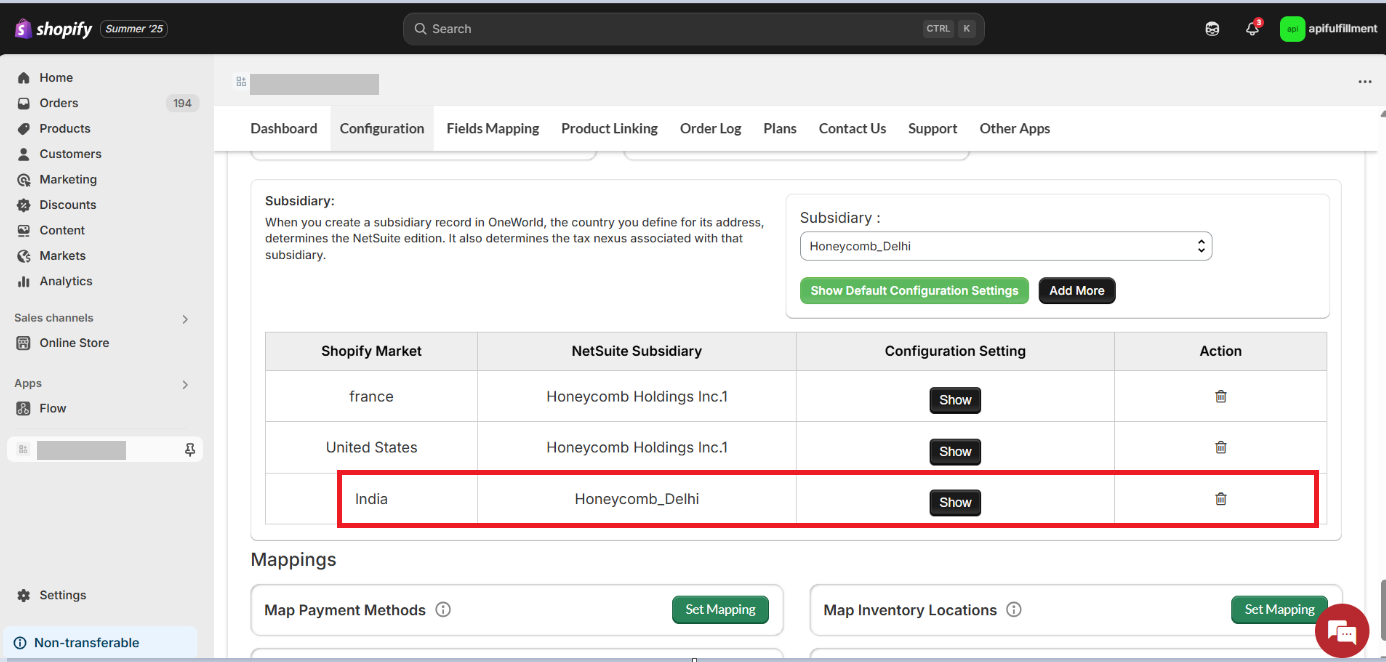
7. Finally, you will see that both the Shopify Market and the NetSuite Subsidiary are mapped to each other. Now, whenever an order is placed in the India Shopify Market, it will be fulfilled from the Honeycomb_Delhi NetSuite Subsidiary.
With our advanced pre-built NetSuite integrator plug-in, e-commerce sellers cannot only map their Shopify market to a NetSuite subsidiary but also utilize various customizations that help them optimize their operations. Let us navigate through these different tailored settings in Robust NetSuite Integrator.
Sellers can add as many warehouses as they have globally. Also, they can map a particular warehouse with one or multiple marketplaces. This is a great strategy for the ecommerce sellers from both a financial and customer perspective. Shopify sellers can increase their revenue by strategizing warehouse allotment for order fulfillment. Suppose a seller has two warehouses, one in the USA and another in Germany, and they get a couple of orders, one from Texas and another from Berlin. In this case, they can assign the Germany warehouse to fulfill the order of Berlin and the USA warehouse to fulfill the order of Texas. This will help sellers save on order fulfillment costs as it reduces the distance between the warehouse and the delivery location. It also saves the cost of cross-border taxes in case they deal in international sales. Another benefit is that they get faster order delivery as the warehouse is much nearer.
How convenient it would be if sellers could implement taxes individually in a particular marketplace according to the rules in the legal domain. Suppose a seller sells in five different marketplaces, such as the US, Germany, the UK, India, and Japan. Each country has different taxation on products, which can be difficult to manage for online retailers. However, with Robust NetSuite Integrator, they can allot different tax amounts or percentages to each of these marketplaces. NetSuite streamlines tax challenges and financial management, making it more efficient.
Every order has a transaction, which has to be recorded in NetSuite. Different order types can be created depending on the requirements of the seller or marketplace. Our smart e-commerce integrator helps businesses create a customized order type, be it, sales order, cash sales, or an invoice.
Tired of fake orders and huge losses resulting from them? Now, Shopify retailers can hold their orders with different time limits in each subsidiary. If a particular location has high order returns and they make huge losses, they can put a higher hold order limit for a particular subsidiary. This helps them inspect the order’s authenticity, and thus, they can choose to deliver the product or not. Hence, they can minimize the losses from each subsidiary, which will increase their revenue.
💎You can also explore how to connect multiple Shopify Store to Single NetSuite account

However, it is quite easy to map Shopify with NetSuite subsidiaries using the advanced NetSuite Shopify integration application. Businesses must utilize this functionality as it helps them leverage real-time syncing of orders and inventory at all the subsidiaries. This way, they can optimize operations and enhance customer experience in all the Shopify markets, which will help increase sales and expand globally.
Don’t wait !! Contact us, and our team will help deploy this functionality using the powerful automation of Robust NetSuite Integrator.

.svg)