

NetSuite Multiple Currencies: Manage Global Finances Easily
WB
WebBee Team
eCommerce Specialists
In today's era of globalization, every company and organization seeks to expand into international markets. Sellers dealing in international trade have to manage the finances in multiple currencies, which can be a tough task for many. This is why NetSuite offers multiple currencies support features for online sellers. Let’s explore how to implement it and utilize it in your B2B & B2C businesses.
Every company is based in a particular country and does business in local currency. However, if any e-commerce sellers want to expand their business at the international level, then they have to do business in that nation's currency. Hence, NetSuite offers this feature if their base currency is different and they want to create transactions with customers and vendors in a new currency.
This is a significant feature that comes with a lot of functionalities. Let us see what all these features can help the eCommerce companies with.
NetSuite offers the currencies by default with this feature. So if the company is based in any of these nations, they can easily select from one of these options. Here are the following nations, along with their currency and symbols.
If the company does not deal in the above nations, it may create a currency record easily and start managing its international finances efficiently. All they have to enter the following information if they want to add a new currency record.
A base currency is quite easy to understand as it is the currency in which the company does business. Generally, it is the local currency, but it can be any other as well, like US dollars, which is accepted in most countries.
To set the base currency, simply click Edit in the required subsidiary by following this path:
Setup > Company > Subsidiaries
Sometimes, the customer wants to do business in multiple locations across the world, and hence, it wants multiple currencies assigned to them. This enhances customer satisfaction as they are assigned the currency that they want, and enables you to record a transaction in their preferred currency.
This is yet another functionality of the multi-currencies feature that helps organizations manage their international finances. The exchange rate is a crucial economic variable that helps businesses do global sales, according to the international financial standards. Each base currency has an associated foreign currency, and the companies have to set up varied exchange rates between them.
The International market experiences a lot of fluctuations daily. So the general ledger accounts of the companies dealing in global selling can be impacted, leading to financial mismanagement. To avoid this chaos, the multiple currencies feature adds certain accounts to the accounts charts once a successful transaction is done, and they help in tracking the values for exchange rate fluctuations.
Finance is a major aspect of any eCommerce business, and managing international finances requires efficient currency management. This includes managing exchange rate fluctuations, setting base currency, creating new currency records, and many others.
Multi-Currency support by NetSuite has several functionalities that make the global expansion hassle-free without any financial fuss.
If the financial management takes a lot of time, it may affect the delivery speed of the order. eCommerce companies can leverage this feature to improve financial management and resolve the delivery issues that are stuck because of poor financial control.
The NetSuite currency feature provides a centralized view of all the transactions, which is helpful in easy analysis and thus getting real-time reporting to make better decisions.
Different countries have various taxation and legalities that affect financial management, but multiple currencies feature makes all of this easy and seamless.
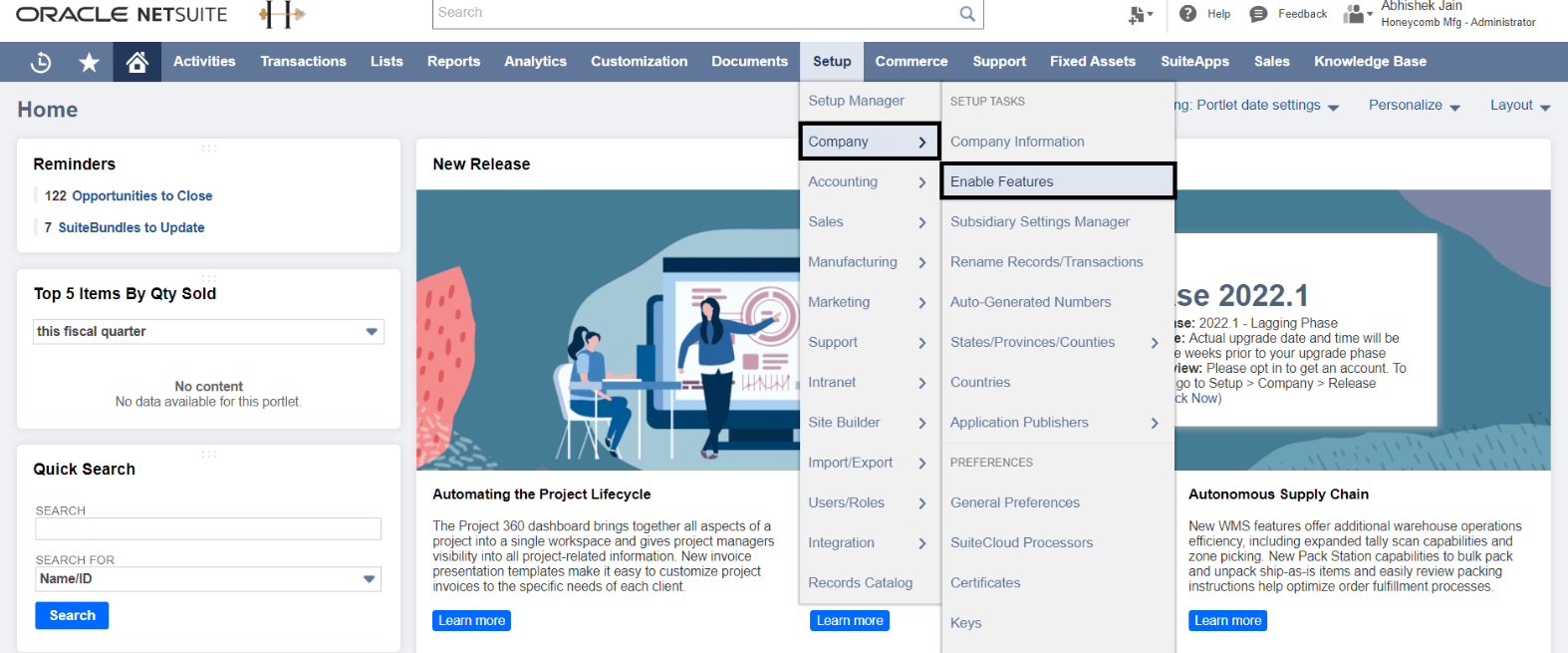
To initiate this process, you have to first login to the NetSuite account. You will find the navigation bar at the top, and there will be a Setup tab. Click on it and then choose Company, and further, select Enable Features.
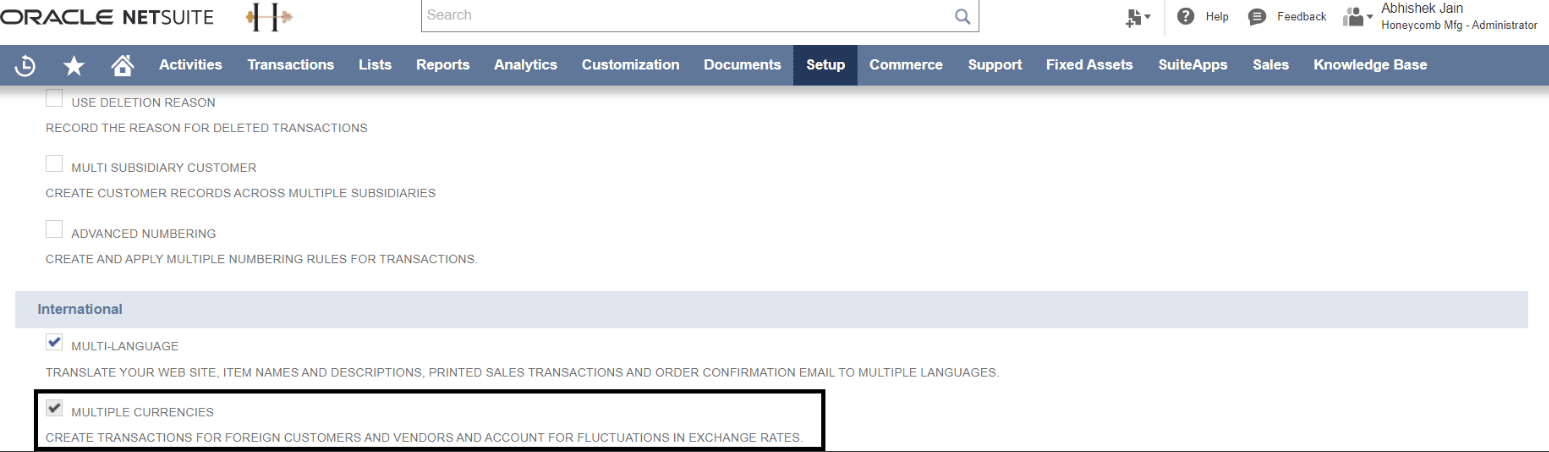
You will come across a section titled as International. Under this, there is an option of Multiple Currency. Just tick mark on the check box against the same.
A. Now you have to login the Robust NetSuite Integrator application and go to its Configuration Page.
B. Here you will find the App Settings, which is to be expanded.
C. Just scroll down a bit to get the Currency Settings section.
D. Here, right in front of the Currency Settings section, you will find the Setup Multiple Currency box.
E. Now choose the Yes option from the drop-down menu under the Setup Multiple Currency box. This will enable you to do the Shopify currency mapping with NetSuite.

To initiate the currency mapping, the internal IDs of each currency in NetSuite is required. Follow these steps to get them:
A. Click on the Lists, which is the third option on the navigation pane.
B. Then select the Accounting option.
C. Finally, choose the Currencies option.

Here, you will find the internal IDs of each currency in front of it.
Enabling NetSuite multiple currencies support is definitely a dynamic functionality that makes the financial and accounting journey of any international eCommerce company smooth. If your business has also undergone NetSuite ERP integration with e-commerce, then you must integrate with Robust NetSuite Integrator to optimize the functionality offered by this amazing feature. Automate all the processes and see things happening swiftly without any hassle with the power of automation offered by Robust NetSuite Integrator. So what are you waiting for? Set your feet for the global expedition, that too, without financial fuss!
Contact us !! to know more about Robust NetSuite Integrator, and our team of experts will help you explore it.

.svg)